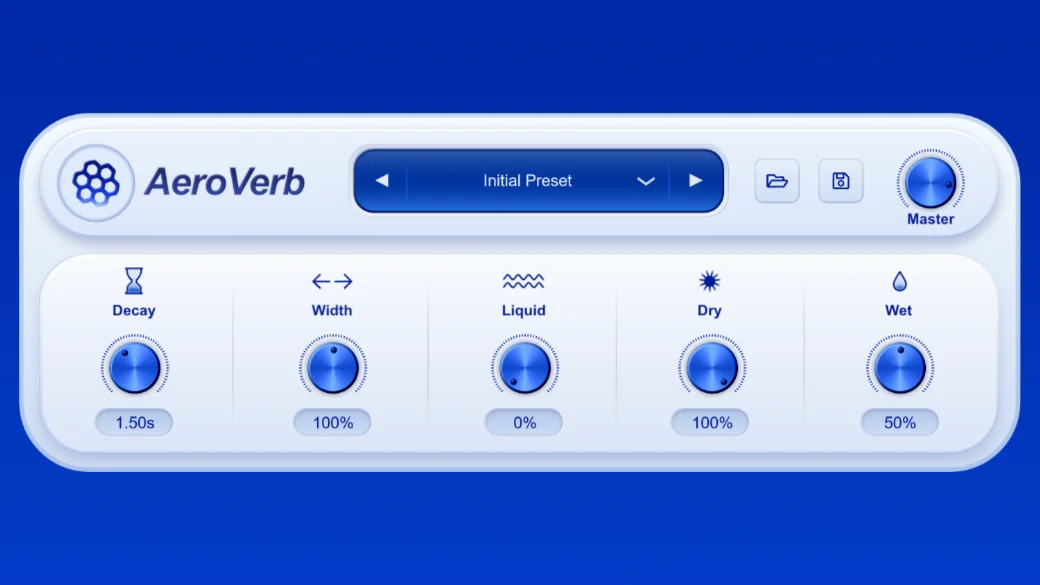
AeroVerb is an algorithmic reverb designed to create sounds ranging from subtle room ambience to huge, immersive spaces. Despite its powerful engine, AeroVerb keeps the workflow simple, letting you shape your sound with just a handful of intuitive controls.
The Interface
Preset Browser

At the top of the plugin you’ll find the Preset Browser.
Use the left and right arrows to quickly browse through factory presets, or click the preset name to open the full preset list. If you create a sound you love, use the Save button to store it as an .aeropst preset, or Load to open one you’ve already created.
Presets are a great way to explore what AeroVerb can do before dialing in your own settings.
Master Volume
In the top-right corner you’ll find the Master knob.
This controls the final output level of the plugin, from -60 dB up to +12 dB. It adjusts both the dry and wet signals together, making it easy to compensate for level changes while designing your reverb.
Reverb Controls

Decay
The Decay knob controls how long the reverb lasts. This is where you control the overall size of the space.
Short values create small rooms for tight ambiences, while long values produce huge spaces with cinematic tails.
Width
The Width knob adjusts the stereo image of the reverb.
- 0% collapses the reverb into mono.
- 100% keeps the natural stereo image.
- Above 100% exaggerates the stereo field, creating an even wider sense of space.
Since only the reverb is affected, your original sound stays focused while the ambience expands around it.
Liquid
The Liquid knob is what makes AeroVerb unique.
Instead of producing a static reverb, it introduces smooth internal movement, giving the tail a fluid and evolving character.
At lower settings, the effect is subtle, while higher values add gentle chorusing, pitch drift, and lush motion.
Dry
The Dry knob controls the level of your original signal.
Leave it at 100% for normal insert use, or turn it down if you want to keep only the wet signal.
Wet
The Wet knob controls the volume of the reverb itself.
Together with the Dry control, you can easily balance the effect to fit your mix.
Resizable Interface
AeroVerb’s interface can be freely resized by dragging the corners of the window.
Everything scales smoothly, so whether you’re working on a laptop or a large studio display, the controls remain clear and easy to use.
Experiment!
The real magic happens when you combine Decay, Width, and Liquid.
Try starting with a long decay, push the Width above 100%, then slowly increase the Liquid control. You’ll hear the reverb transform from a simple room into an evolving texture that feels alive without overwhelming the original sound.
That’s it!
You now know everything you need to get started with AeroVerb.
Ready to hear it for yourself? Download or purchase AeroVerb and start experimenting!